
If you play Fortnite, you've probably thought about changing your Fortnite nickname at least once. Although it seems easy and simple to do, in practice many people get confused and can't change their name in Fortnite. If this is your case, don't worry, because in this article we will explain the step-by-step process of how to change your name on Epic Games. Excited to make the change? Then let's get to the step-by-step guide!
How to Change Your Nickname in Fortnite on PC
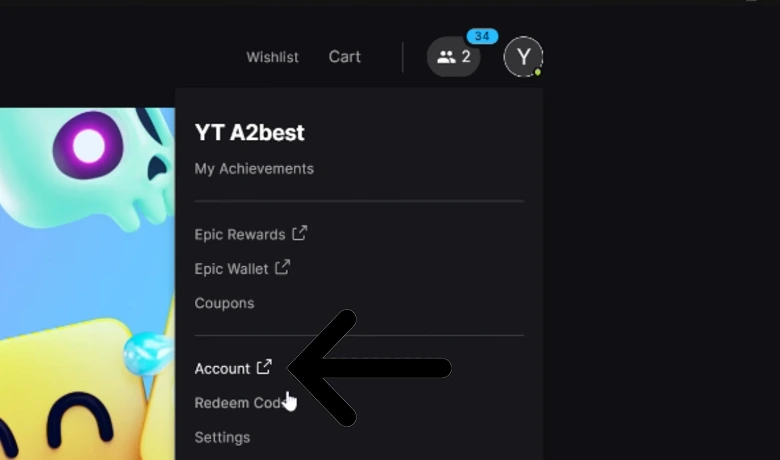
If you play Fortnite on PC and want to update your display name, the change must be made directly through your Epic Games account. To begin, go to the official Epic Games website at [website address]. epicgames.com, Log in to your account. Once logged in, hover your cursor over your username, located in the upper right corner of the screen, and select the "Account" option.
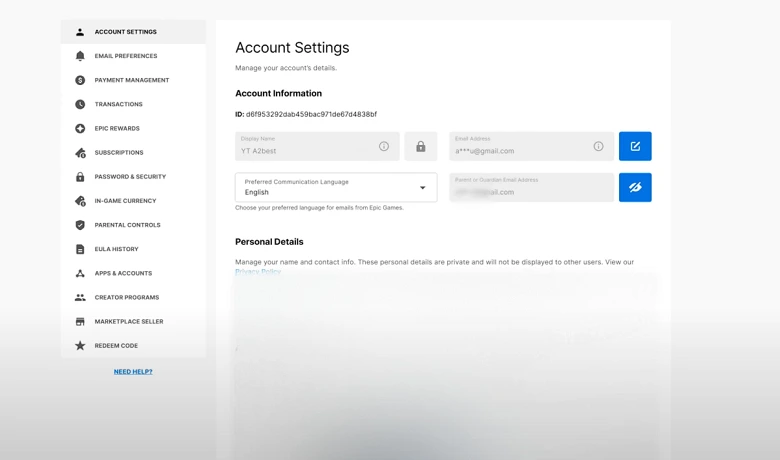
On your account settings page, go to the “General” tab, where you will find the “Display Name” field. Click the pencil icon next to your current name to edit it. Then, type the new name you want to use in Fortnite. Remember that the name must be available and comply with Epic's guidelines. After choosing, check the confirmation box acknowledging that you can only change your Fortnite nickname once every two weeks, and then click “Confirm”.
Once you complete this process, your new nickname will be automatically updated across all platforms linked to your Epic account. This is the official and safest way to change your nickname in Fortnite while playing on PC.
How to Change Your Nickname in Fortnite on Console
For console players, the name displayed in Fortnite is linked to the username of their respective platform account, and not directly to Epic Games. This means that for Change your nickname in Fortnite. On consoles like the Nintendo Switch, Xbox, or PlayStation, you need to change the display name of your console account. Below, we explain how to do this on each one.
Nintendo Switch
On Nintendo Switch, the name that appears in Fortnite is the same as the nickname set on your Nintendo account. To change it, go to [link to Nintendo account settings]. accounts.nintendo.com Log in with your credentials. Once inside the account dashboard, go to your user profile and click "Edit". From there, you can type a new nickname. After saving the changes, the new name will be automatically updated in Fortnite. This is the most effective method to change your nickname in Fortnite if you play using the Switch.
Xbox
If you play Fortnite on Xbox, the name displayed is your Xbox Live gamertag. To change it, go to the Microsoft website at [link to Microsoft website]. account.xbox.com Sign in with your Microsoft account. Then, go to your Xbox profile and click "Customize," then select "Change gamertag." On this screen, you can enter your desired new name, check if it's available, and confirm the change. The first gamertag change is free, but future changes may incur a cost. This process is essential for anyone who wants to change their Fortnite nickname through Xbox.
PlayStation
For PlayStation players, the name that appears in Fortnite corresponds to your PSN account's Online ID. To change it directly on the console, go to the "Settings" menu and access "Account Management," then select "Account Information" and then "Profile." Within this section, choose the "Online ID" option to modify your username. You can also make this change through the official PlayStation website. After the change, the new nickname will be automatically reflected in Fortnite. Remember that, just like on Xbox, the first change is free. This is how you can change your nickname in Fortnite while playing on PlayStation.
Conclusion
So, did you like our list on how to change your nickname in Fortnite? Were you able to make the change following our step-by-step guide? Did you have any problems? Tell us in the comments! Want to know more about Fortnite? Then check out our article about it. the 9 best Fortnite players in the world! Now, if you need to see a video on how to change your nickname in Fortnite, watch the video below.